![Asset 2.svg]](https://help.truleo.co/hubfs/Asset%202.svg)
1. Set up your phone and PIN (My Notes tab)
-
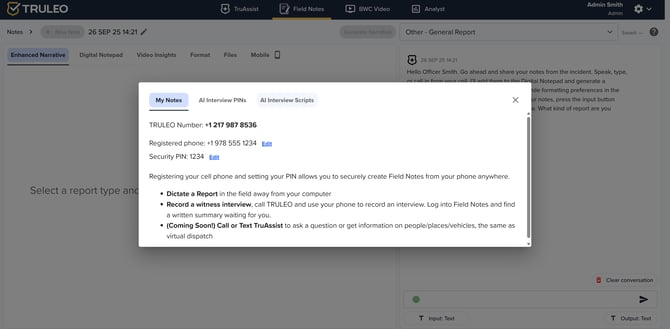
In the My Notes tab, TRULEO shows a unique TRULEO number, the registered phone number and a security PIN for the officer (e.g., PIN 1234).
-
The instructions explain that registering your cellphone and setting the PIN lets you dictate reports from the field and record witness interviews using your phone. When you call TRULEO, the system will save audio and generate a written summary.
2. Generate a PIN for witnesses (AI Interview PINs tab)
-
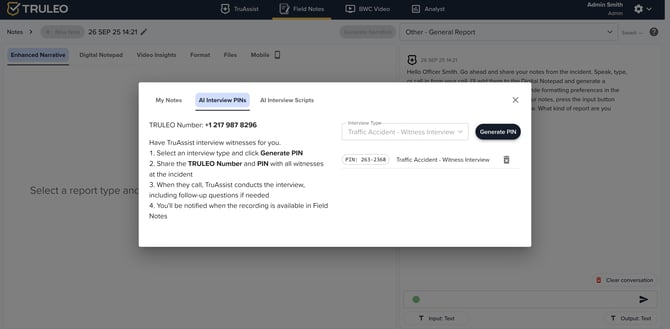
In the AI Interview PINs tab, TruAssist can conduct witness interviews for you.
-
You select the interview type (e.g., “Traffic Accident – Witness Interview”) and click Generate PIN to create a unique code.
-
The screen instructs you to share the TRULEO number and the generated PIN with all witnesses at the scene. When the witnesses call that number, TruAssist will conduct the interview and ask follow‑up questions as needed. The officer receives a notification when the recording is available in Field Notes.
3. Start a report or talk to TruAssist (Digital Notepad)
-
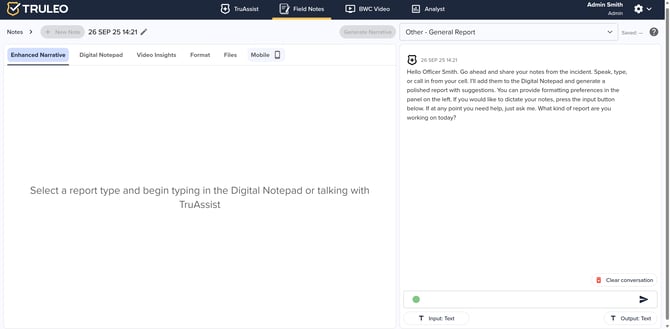
Back in the main TRULEO interface, officers can begin a report by choosing a report type and typing into the Digital Notepad.
-
A message from TruAssist suggests that you can speak, type or call in your notes from your cellphone. TruAssist will place them in the digital notepad and generate a polished report with suggested formatting. Officers can also dictate notes using the input button below if needed.
4. Review and customize interview scripts (AI Interview Scripts tab)
-
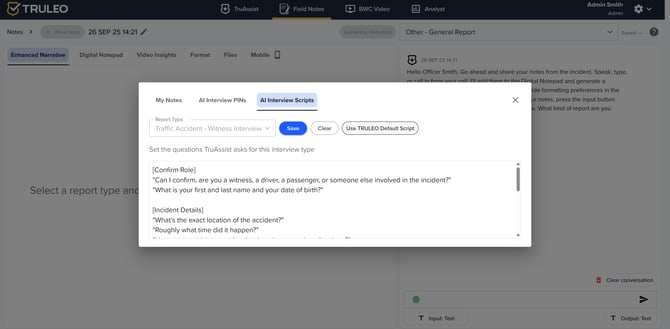
The AI Interview Scripts tab allows you to tailor the questions that TruAssist will ask witnesses.
-
You can choose a report type and either keep the default TRULEO script or customise it. The interface shows categories such as Confirm Role and Incident Details with default questions like “Can I confirm, are you a witness, a driver, a passenger, or someone else involved in the incident?” and “What’s the exact location of the accident?”
-
Officers can add or remove questions and must remember to save their custom script. A Use TRULEO Default Script button restores the standard questions if needed.
These steps illustrate how TRULEO’s AI‑assisted witness interviews streamline the process: officers set up their phone and PIN, generate a unique PIN for each witness interview, dictate or type notes into the digital notepad, and customize the interview script. TruAssist then interviews witnesses and produces audio recordings and written summaries, notifying officers when the material is ready.