![Asset 2.svg]](https://help.truleo.co/hubfs/Asset%202.svg)
How citations work
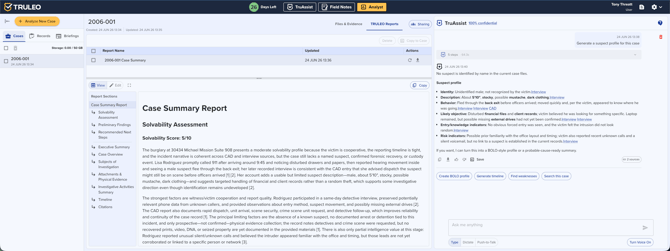
A Sources link appears above each TruAssist response.
-
Click it to expand the list of documents referenced and the exact pages consulted.
-
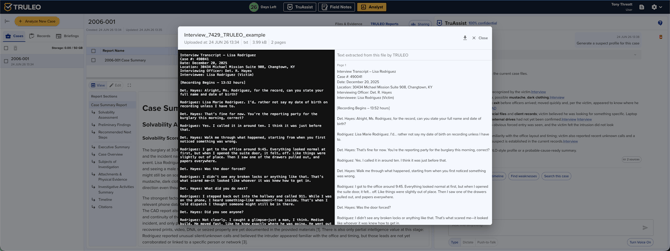
Click any citation to open that document at the referenced page.
-
If the citation points to an audio or video file, the player starts at the cited moment.
-
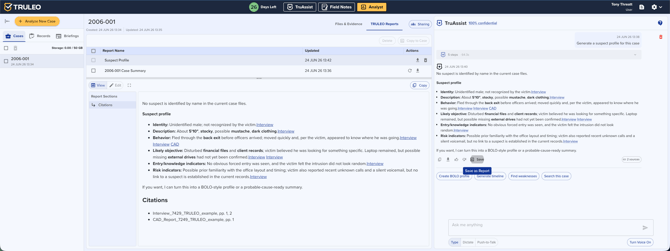
If it points to a report TRULEO generated, a preview of that report opens.
-
This applies to all source types: policy manuals, statutes, training guides, and case files.
What TruAssist can access
The documents available to TruAssist depend on where you're using it:
In TruAssist (standalone)
- Your agency's uploaded policy documents (uploaded by an admin in Document Management — see below)
- State and local statutes connected to your account
- Training manuals and report-writing guides
- Wellness and crisis resources
In TruAssist inside Analyst
When you use TruAssist from within an Analyst case, it has access to everything above plus:
- All files uploaded to the current case (reports, statements, transcripts, evidence)
- Reports and outputs generated for the case
TruAssist automatically scopes answers to the right source — case-specific questions draw from case files; policy and procedure questions draw from your agency's documents. You don't need to switch modes.
How your policies get into TruAssist
TruAssist can only cite policies that have been uploaded to your agency's account. To add them, open Document Management in Settings, click Upload Document(s), and choose the Policy category. Once a document finishes processing, TruAssist can search it.
If TruAssist can't find your policy
If you ask about "our policy" and the matching document hasn't been uploaded, TruAssist won't have your agency's wording. When it can't find supporting text, it will say so rather than guess. In that case:
-
Ask your admin to upload the policy in Document Management.
-
Check that the document has finished processing.
-
Include the policy name or section in your question (for example, "use of force policy, section 4").
-
Don't paste policy text into chat as a workaround for citations — cited answers come from uploaded documents.
Why citations matter
- Accountability — verify that TruAssist's guidance aligns with your official policies
- Confidence — knowing exactly where an answer came from makes it actionable
- Audit trail — supervisors can see which documents were referenced during an interaction
- Training — cited documents are accessible for deeper review or study
Best practices
- When asking about a specific case inside Analyst, mention the relevant details — TruAssist uses them to search case files more precisely
- For policy questions, ask with the scenario context included (e.g., "What's the policy on searches during a traffic stop?") — this helps TruAssist retrieve the most relevant pages
- Click through citations before acting on any policy guidance