![Asset 2.svg]](https://help.truleo.co/hubfs/Asset%202.svg)
Turn on texting
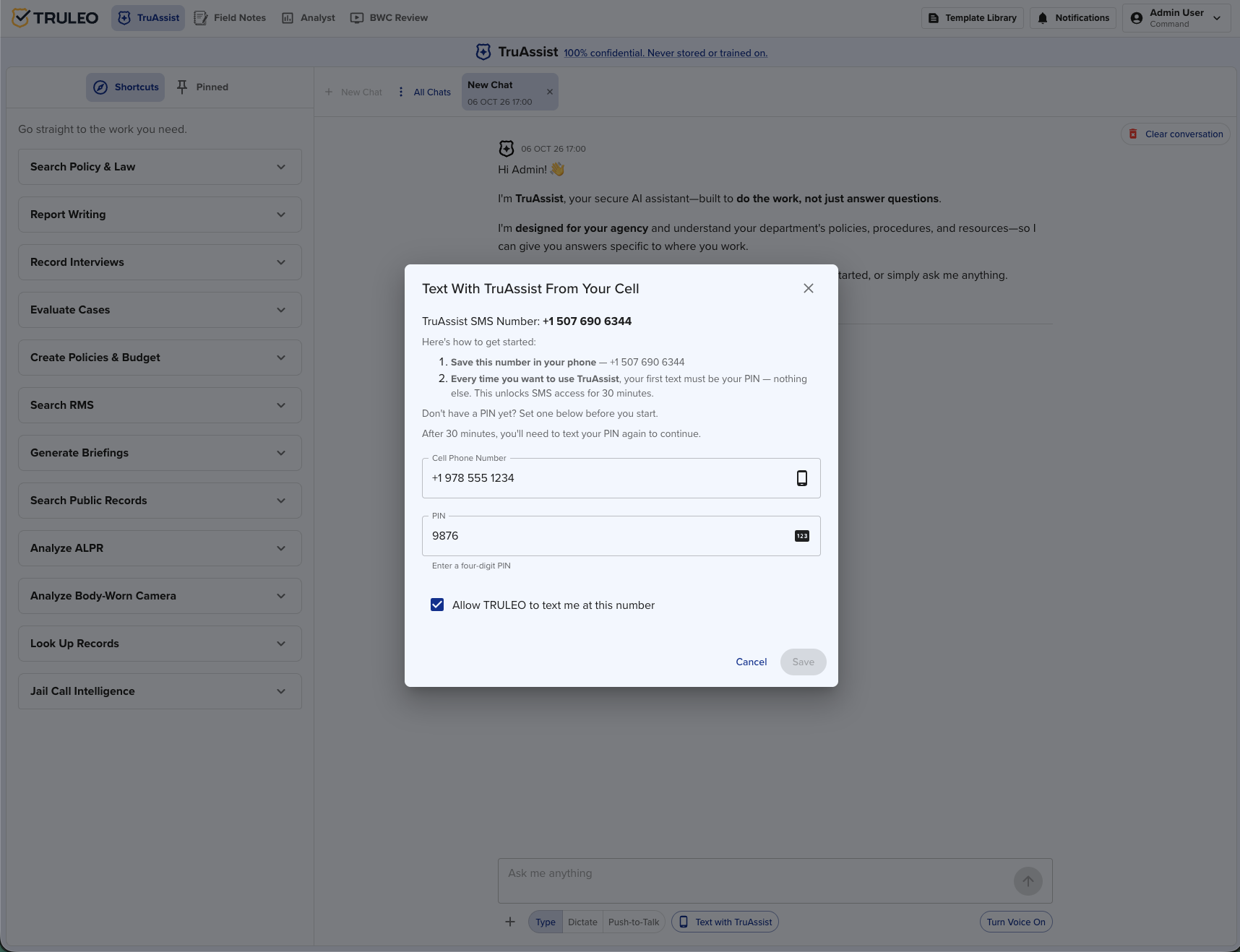
- In TruAssist, click Text with TruAssist.
- In Text With TruAssist From Your Cell, note TruAssist SMS Number and save that number in your phone.
- Enter your Cell Phone Number and a four-digit PIN. Leave Allow TRULEO to text me at this number checked.
- Click Save.
The same number is on your profile when Allow TRULEO to text me at this number is checked. The profile line reads: "You can also send incoming texts to TruAssist at:" followed by the number.
Text from the cell number you saved. A text from any other number receives a signup link.
Start a session
- Text your four-digit PIN by itself to the TruAssist SMS number. Leave the question for the next text.
- TruAssist replies: "PIN confirmed. You can now send messages for the next 30 minutes."
- Text your question.
- After 30 minutes, text the PIN by itself again. TruAssist replies with the same confirmation and opens a new 30-minute window.
A question sent before the PIN is confirmed gets: "SMS pin not confirmed. Please confirm your pin first."
A question sent after the window expires gets: "SMS pin confirmation expired. Please confirm your pin again by sending it in a new message without any other text."
What comes back
TruAssist sends two texts.
- "Working on your message..."
- A link to that reply in TruAssist, then TruAssist's written reply.
The link looks like https://truleo.co/_/ followed by a number. Opening it requires you to be logged in.
The second text stops at 1,200 characters, including the link. There is no "continued" line.
- When the words after the link are the full answer, read them in the text.
- When the answer stops mid-thought, open the link while logged in. The link opens the full reply saved for that text.
- When the words after the link are only a short follow-up, such as a prompt to ask another question, the answer was a table, chart, or image. That content is not in the text and not behind the link. Ask the question in TruAssist in the app.
What you can ask by text
- A policy, statute, or procedure question when the answer is plain text
- A short lookup written out as text, such as a vehicle, a person, or call history
Ask these in the app
- Tables, charts, images, and relationship diagrams
- Report writing
- Uploading files
- Questions that need your current location
- Follow-up buttons and menus
Example
An officer on foot patrol needs the noise-ordinance rule and has no computer.
- They click Text with TruAssist, save their cell number and PIN, and save the TruAssist SMS number in their phone.
- They text the PIN alone and wait for "PIN confirmed. You can now send messages for the next 30 minutes."
- They text: "What does our noise-ordinance policy say about late-night complaints?"
- They receive "Working on your message...", then a link and a short summary they can read in the text.
When the policy answer is longer than the text allows, it stops at the character limit. They open the link while logged in to read the rest. When the answer is a table, they ask again in TruAssist in the app.
Best practices
- Save the TruAssist SMS number in your phone before you need it in the field.
- Send the PIN alone. A question in that same text does not open the 30-minute window.
- Read a complete answer in the text. Open the link when the reply stops early.
- Use TruAssist in the app for tables, charts, and report writing.